Fiji and Napari - Sharing the Same CUDA Code

Image processing and analysis play an important role in science and engineering. Some calculations require heavy computation, thus needing a GPU to run some of the algorithms in a feasible time. However, the ecosystem of scientific image processing software is broadening. Fiji, a distribution of ImageJ written in Java, has been around for decades and is popular in biomedical imaging and other similar fields. In the Python world, Napari was released - another image processing tool for the Python community. Both of these software tools have a GUI for users to inspect and process the images.
Because these software applications are written in different languages, writing an algorithm in one language may mean it is only usable in one software application but not the other. For GPU kernels, custom functions which run on the GPU, I recommend a hybrid programming approach. You write the underlying mathematical algorithm in CUDA and compile it to a set of virtual machine instructions for the GPU. This can be called from either Java or Python, allowing your algorithm to be portable across different programming languages.
The Mode Filter
In my previous career, I developed a statistical method to detect defects in 3D printing. This was done by using a single 2D x-ray projection of the product, rather than a full 3D CT scan, to save time and cost at the expense of accuracy.
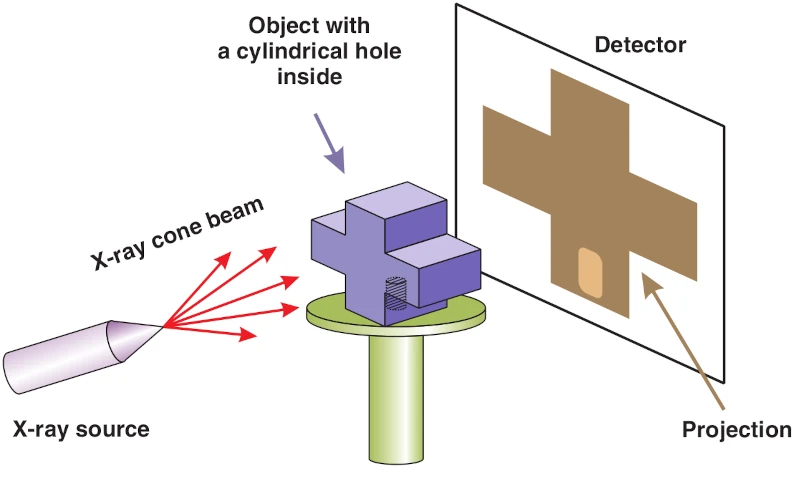
Figure 1: A simplified diagram of taking an x-ray projection of an object with a cylindrical hole inside. The cylindrical hole should appear in the x-ray project. Source: Warnett et al. (2016) doi:10.1088/0957-0233/27/3/035401
One software output from this is an image filter called the mode filter. To explain the mode filter, we can look at something similar - the mean filter. In the mean filter, each pixel in an image is replaced with the mean of local pixels around it. This smooths out the image uniformly. With the mode filter, it takes the estimated mode instead of the mean and this results in outlying features being removed. This happens because the mode is a robust measure of central tendency; it is not affected by outliers compared to the mean.
The mode filter is useful as it can remove holes in an image. As a result, the filtered image can be used as a background in statistical tests to detect defects such as holes. One example we can look at is a used archery target in Figure 2.
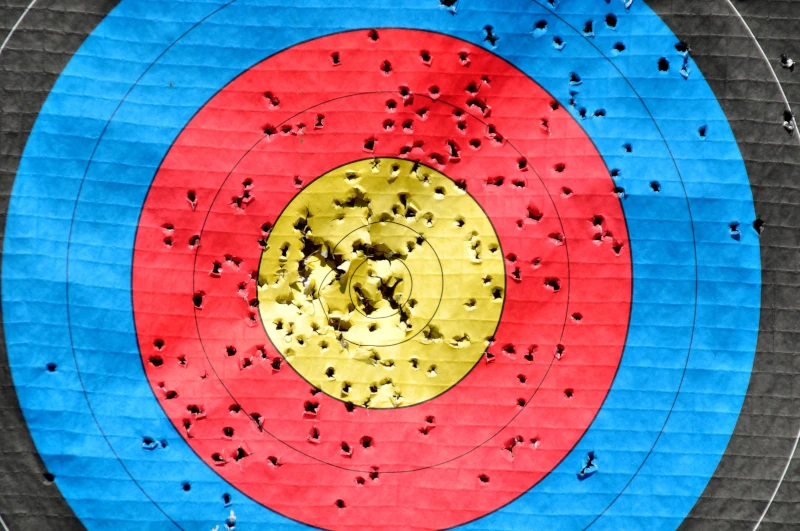
Figure 2: A colour photo of a used archery target. The colour of the circular zones from the centre to out are gold, red, blue and black. There are holes on the target as a result of arrows shot at it previously. The image is 4288×2848 pixels in size.
A used archery target is typically covered in holes as a result of being shot at by arrows. The mode filter can be used to smooth the image in such a way that it keeps the colour and shape of the circular scoring zones and removes the holes. The mean filter, however, smooths everything out uniformly, causing the holes to blend in with the target face and the boundaries of circular scoring zones start to blur. The resulting filters is shown in Figure 3.
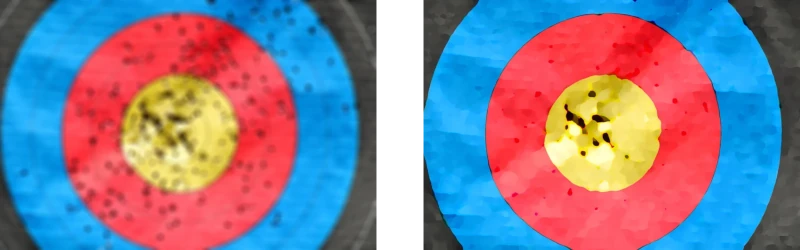
Figure 3: Left and right show the resulting mean and mode filtered image, respectively. A kernel radius of 50 px was used, meaning pixels within a 50 px radius circle were used in the local statistics.
One weakness of the mode filter to remove holes is that the size of the holes do need to be known beforehand. If an archer is good enough and scores multiple arrows in the gold, the holes will start to form a tear. In that scenario, the tears may remain after filtering, like in Figure 3, because the larger hole formed by the tear may not be anticipated as an outlier in the filter.
The Algorithm
In this section, we will explain the mode filter in detail and what it means to take the estimated mode. The mode in this context is not the same as the mode for discrete variables; for example, the mode number of legs a dog has is four. Rather, the mode here is for continuous variables.
We first consider a pixel in an image. We draw a circle around it, called a kernel, and collate the pixel values in that kernel only. Figure 4 illustrates this for a given pixel. The density estimation \(p(z)\) can be worked out from those pixel values using
where \(z_i\) are the pixel values in the kernel, \(h\) is a tuning parameter and \(\phi(z)\) is a Gaussian function \(\phi(z) = \exp\left(-z^2\right)\).
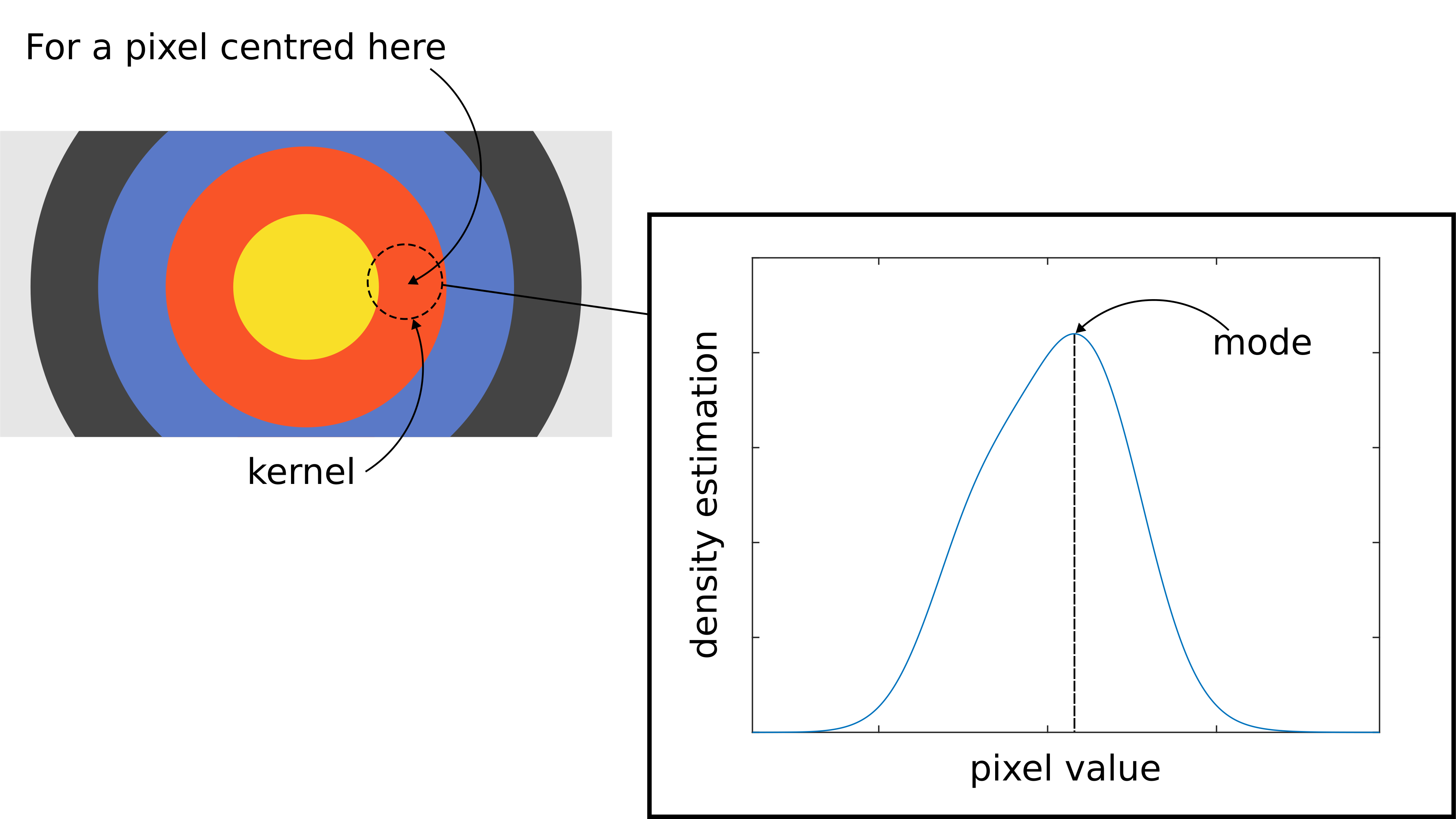
Figure 4: Left shows an illustration of the image of an archery target. For a given pixel, a circular kernel is drawn centred at it using a dashed line. Using the pixel values inside the kernel, a density estimation can be calculated or plotted as shown on the right hand side. The mode is located where the density estimation is at its maximum.
The estimated mode is the value of \(z\) which maximises \(p(z)\). This can be numerically calculated using the Newton-Raphson method. This is an iterative algorithm which should converge to a solution. Given an initial value \(z^{(0)}\), the Newton-Raphson method is given as
and this is calculated for \(z^{(1)},z^{(2)},z^{(3)},\cdots\) until some convergence condition is met. The algorithm may converge to a local maxima so it is recommended that this algorithm should be repeated with different initial values.
We won't analyse the equations in depth. Choosing the radius of the kernel and the tuning parameter is beyond the scope of this blog. Rather, we state the algorithm here to illustrate that the mode filter can be rather computationally expensive. Each step of the Newton-Raphson method involves evaluating the first and second log derivatives, each involves all pixel values in the kernel in a summation. In addition, this is just for one pixel. For the mode filter, this is to be conducted for all pixels in the image.
Parallel Implementation
Fortunately, the algorithm can be parallelised because the computation instructions are the same and independent for every pixel, making this suitable for multi-threaded CPU programming or GPU programming.
For my CPU implementation in Java, I assigned each thread to work on a row of pixels in an image. This reduces context switching overhead as we assign hundreds of rows in an image to the tens of physical CPU cores.
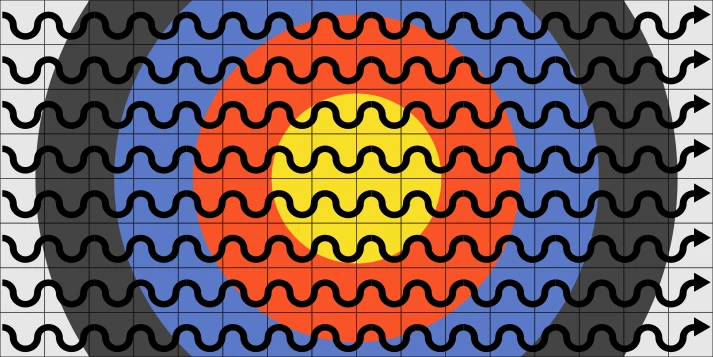
Figure 5: An illustration of the image of an archery target. A grid is used to illustrate pixels in the image. An arrow represents a CPU thread and each CPU thread is allocated individual rows of pixels to work on.
For my GPU implementation, I programmed using a hybrid of Java and CUDA and assigned each GPU thread to work on a pixel. This fits in the single instruction multiple threads (SIMT) paradigm as multiple threads in a warp execute instructions across pixels simultaneously.
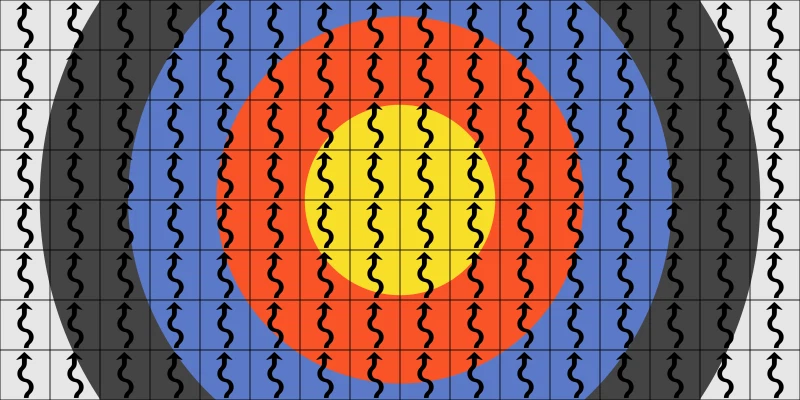
Figure 6: An illustration of the image of an archery target. A grid is used to illustrate pixels in the image. An arrow represents a GPU thread and each GPU thread is allocated to individual pixels to work on.
Figure 7 shows the benchmark of applying the mode filter on the archery target image. Very impressively, we see a significant speed-up of at least 14× using a GPU over a CPU. It could be argued this isn’t a fair hardware-to-hardware comparison because we’re comparing a Java-based CPU implementation with a hybrid Java-CUDA GPU implementation. However, during development, I wrote the CPU code first to test the feasibility of the algorithm before identifying bottlenecks and then implementing it on a GPU. Thus, the benchmark also shows the performance achieved by the optimisation journey from CPU to GPU.
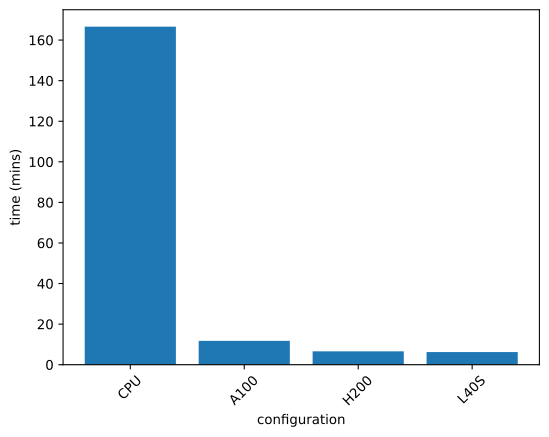
Figure 7: Benchmarks when running the mode filter on a 4288×2848 sized
colour image. A kernel radius of 50 px and 30 initial points for optimisation
were used. For the CPU, 96 cores on the ehc node using the AMD EPYC 9965 were
used.
At the time of writing, we purchased the L40S GPUs. They are newer and cheaper GPUs compared to the A100 and H200. However, the L40S GPUs are designed for fast numerical computation. Hence, for this particular problem, the L40S GPUs performed just as well as the more expensive H200. This was discussed in a previous blog post.
Hybrid Programming
Of course, this is one optimisation route out of many. Python offers many GPU ecosystems such as numba and PyTorch. The package numba offers JIT CUDA compilation of Python code, discussed in a previous blog post, which makes it easier for programmers very familiar with the language. However, a problem is that you’re stuck in the Python ecosystem. Because I wrote my GPU code with CUDA, it is portable and can be bound to either Python or Java.
To demonstrate this, we will look at two image processing applications, Fiji and Napari. Fiji is a distribution of ImageJ and is written in Java. A very old program with lots of legacy code, it is still used today in science and engineering. Napari, on the other hand, is newer and written in Python. Both software packages support plugins, meaning you could write your own filters and have them run integrated in the software.
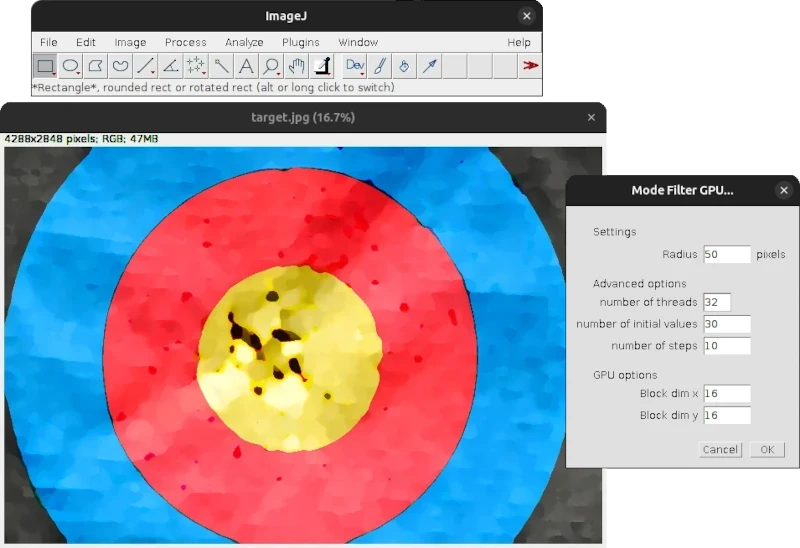
Figure 8: The mode filter being used in ImageJ
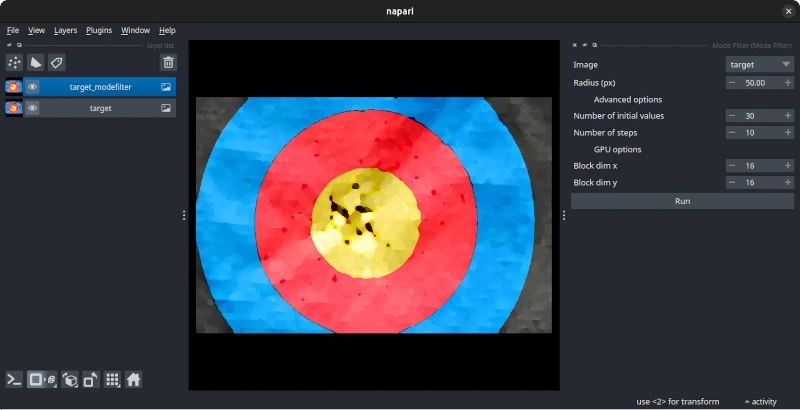
Figure 9: The mode filter being used in Napari
To run CUDA code in Java and Python, we used the binding packages
JCuda and CuPy,
respectively. Firstly, we compile our CUDA code into a .ptx file, which
contains virtual machine instructions for the GPU, similar to assembly language.
This .ptx file can be read and run by JCuda and CuPy, giving both Java and
Python the ability to run CUDA code. As a result, we can hit two birds with one
stone, where our one CUDA implementation of the mode filter can be run on
different image processing software, catering for a wider audience.
Conclusion
In summary, we’ve sped up the mode filter by transitioning the code from CPU to GPU. In addition, with hybrid programming, we code the GPU using CUDA, which can be run by various image processing applications, such as Fiji and Napari, which runs on Java and Python, respectively. By doing so, we’ve made use of the fast CUDA programming while making the filter accessible and portable to a wider community.
The code is available on my GitHub.