Modernising Rcpp and C++ Code With std::span

The programming language C++ is still widely used today, especially for high-performance computing. Out-of-date practices from the 80s and 90s should still work now because the language is designed to be highly backwards compatible. As C++ evolved, there were numerous efforts to modernise the language and update programming practices with new features to improve the C++ experience, such as memory-safety features.
As new practices are introduced, there are multiple ways to do the same thing. Entrenched programmers may stick with older practices, whereas modern programmers may keep their practices up to date. Newer programmers have a clean slate to learn best practices and make it a habit, but they may also pick up an old textbook or tutorial and learn out-of-date practices.
I’m guilty of this myself. When I wrote my R package
poLCAParallel, I started off with
out-of-date practices due to my past training. Over time, I’ve modernised the
code with newer features and better practices. This keeps the code maintainable
and helps catch commonly occurring bugs due to old practices.
In this blog post, we will look at std::span, introduced in C++20, and how it
can be used to modernise C++ code. It allows the program to view existing blocks
of memory without having to copy them. It also has built-in tools to avoid
out-of-bounds errors. However, implementing these new features in your code too
early may cause problems on systems which may not have caught up with the new
C++ standards, which we will discuss. I will also suggest some practices when
programming in C++ for R via Rcpp.
At the start of the blog post, we will assume the reader is using Linux with a
g++ C++ compiler using the libstdc++ standard library. We will compile and
run them via R using Rcpp, which the reader should have installed. Later on,
we will explore some differences on MacOS and how some of the modern C++20
features are not available on older MacOS systems.
Separating the Two Worlds
In hybrid programming, you program in two or more languages. For example, my package uses R for the user interface and C++ for the underlying mathematical calculations. One practice I would suggest is to separate the two ecosystems. For example, I would like my C++ code not to depend on anything related to R. By doing so, the C++ code is isolated and can be compiled and tested without any R dependencies. This is useful to pinpoint bugs should one occur; is it related to R or C++?
We will start off with a foundational C++ code and build onto it throughout the blog post.
// filename: adder.cc

#include <cstddef>

#include <Rcpp.h>

class Adder {
 private:
  double* vector_;
  std::size_t length_;

 public:
  Adder(double* vector, std::size_t length): vector_(vector), length_(length) {}
};

// [[Rcpp::export]]
void AdderRcpp(Rcpp::NumericVector vector) {
  Adder adder(vector.begin(), vector.size());
}
To run this in R, compile it using Rcpp::sourceCpp() and pass a vector to the
exported function. Nothing should be outputted as the code only does some basic
variable initialisation.
Rcpp::sourceCpp("adder.cc")
AdderRcpp(c(1, 1, 1, 1, 1))
In the example, the function AdderRcpp() is an exported function which can be
called from R by passing a vector. The library Rcpp represents this vector,
passed from R, as a Rcpp::NumericVector object, which contains information
about the data in this vector.
To isolate the C++ code from the R ecosystem, we extracted all of the required
information from the Rcpp::NumericVector object. To access the data, we need
the address of the data and the length of the vector. These can be obtained by
using the methods vector.begin() and vector.size() respectively. We can pass
and store them in the class Adder for future use.
You can see that the class Adder uses primitive C++ types only and is isolated
from anything R or Rcpp related. This allows the class to be tested by itself
by providing any data through the pointer double* vector and not necessarily
from R. If we had to pass a Rcpp::NumericVector object or reference instead,
the class is bound to the Rcpp ecosystem through Rcpp::NumericVector. This
adds an unnecessary layer when it comes to testing this class, having to
strictly pass data through an Rcpp::NumericVector object. By using a primitive
pointer, we can pass data generated from external sources, such as from the
standard C++ library, testing suites or any other program, making the class more
general and flexible.
Old Habits Die Hard
We can demonstrate some old practices, one of which is using C-style arrays. In
this approach, an array is represented by a pointer and an integer. The pointer,
denoted by a * symbol after the type, contains the starting address of the
array and allows you to read and write its elements. The integer, usually of
type std::size_t, tracks the total number of elements in that array.
One example to demonstrate C-style arrays is to increment the last two elements
of the array. We can call this method IncrementLastTwo(). We use a for loop,
iterating from the second to last element to the last inclusive.
// filename: adder.cc

#include <Rcpp.h>

#include <cstddef>

class Adder {
 private:
  double* vector_;
  std::size_t length_;

 public:
  Adder(double* vector, std::size_t length)
      : vector_(vector), length_(length) {}

  void IncrementLastTwo() {
    for (std::size_t i = this->length_ - 1; i <= this->length_; i++) {
      this->vector_[i]++;
    }
  }
};

// [[Rcpp::export]]
void AdderRcpp(Rcpp::NumericVector vector) {
  Adder adder(vector.begin(), vector.size());
  adder.IncrementLastTwo();
}
In the code above, we passed a pointer, using vector.begin(), and the length
of the array, using vector.size(), to the constructor of Adder. By passing a
pointer, the method IncrementLastTwo() can modify the contents of the array
without having to return anything.
We can test this in R
Rcpp::sourceCpp("adder.cc")
x <- c(1, 1, 1, 1, 1)
AdderRcpp(x)
print(x)
which outputs
1 1 1 1 2
Uh-oh! We see that there's a mistake in our code because only the last element of the array has been modified. Furthermore, the code wrote to memory out of bounds past the end of our vector! It is concerning that C++ will just write to memory not allocated to us without warning and with little trace, not appearing in our output. This sort of behaviour can be described as non-memory-safe.
Modifying Function Arguments
Notice how the R vector x was modified in the function call AdderRcpp(x)
without using a return value. This is because we are passing a reference to
that vector to the function, allowing it to be modified.
This sort of practice is common in C++ but may be very unusual in R. Some programmers will treat parameters as inputs and immutable, so modifying them instead of returning an output can be quite confusing and unexpected. Plan what sort of API you would like to present for your target user.
One of the reasons that this is not memory safe is because the pointer
double* vector_ is primitive. You can add or subtract any number to it and
you can attempt to read or write to some arbitrary piece of memory. We could
have used the length of the vector std::size_t length_ to ensure our memory
access is within bounds, but as shown above, this assumes we used the variable
correctly in the first place.
C with Classes
The language C++ was marketed as "C with Classes". We've demonstrated this literally by using a C-style array inside a class. Later on in this blog, we will show how C-style array practices can be seen as legacy, replaced with modern C++ features. Thus "C with Classes" may be seen as an outdated view of C++, which arguably has turned into its own language.
The use of classes in this example is an overkill; we could have done the same thing using functions only. The reason we demonstrated classes here is to build up what you would typically see in C++ code, assigning data to a member variable and then modifying it later on.
Ownership is ambiguous with C-style arrays
When handling a pointer, also called a raw pointer, the ownership is
ambiguous as the type itself does not imply who is responsible for the
memory management of the array. In our example, the memory management is
done by the R ecosystem through Rcpp::NumericVector.
We could have created an array using, for example,
double* vector = new double[5] and pass that pointer to the class to be
used for viewing and writing the array. However, by doing so, it is
ambiguous who is responsible for managing the memory of the array. Is it the
class or another function? The type double* on its own does not convey
this information.
Creating arrays and passing raw pointers this way is considered an outdated practice.
Assertions
We can use assertions to test if variables are valid before using them. It is
given that this->vector_[this->length - 1] accesses the last element of the
vector. We can use this fact to write an assertion to ensure that we do not
access data beyond the last element of the vector.
// filename: adder.cc

#undef NDEBUG

#include <Rcpp.h>

#include <cstddef>

class Adder {
 private:
  double* vector_;
  std::size_t length_;

 public:
  Adder(double* vector, std::size_t length)
      : vector_(vector), length_(length) {}

  void IncrementLastTwo() {
    for (std::size_t i = this->length_ - 1; i <= this->length_; i++) {
      // We add an assertion here
      assert(i < this->length_);
      this->vector_[i]++;
    }
  }
};

// [[Rcpp::export]]
void AdderRcpp(Rcpp::NumericVector vector) {
  Adder adder(vector.begin(), vector.size());
  adder.IncrementLastTwo();
}
When running it this time, you get an assertion error
R: adder.cc:21: void Adder::IncrementLastTwo(): Assertion `i < this->length_' failed.
Aborted (core dumped)
The assertion helped prevent out-of-bounds memory access and caught a bug.
Debug Mode
By default, Rcpp will run in no-debug mode, turning off all assertions. To
turn on assertions, we have to undefine the no-debug mode environment
variable with #undef NDEBUG
By contrast, C++ runs in debug mode by default, executing all assertions.
The reason assertions can be turned on and off is mainly for performance reasons. Doing many assertions and bound checks can slow down your code and is arguably unnecessary if you're certain your code works as it should. On the flip side, turning off assertions runs a risk of bugs slipping through by removing these safe-guards you've put in place. To balance the double-edged sword, I would recommend running in debug mode for your tests and turning it off for your production code.
Assertions should not be used to validate user input
Assertions should not be used to validate user input; they're for validating the machinery of your program in debug mode. In production code, you still want to validate user input.
With our design philosophy, by separating the code into an R interface and a C++ number crunching machine, we can put the user input validation step in R. This way, you can focus on testing or asserting the C++ machinery of your program under the assumption that the user input is valid.
In this example, it could be argued that the assertion is unnecessary because
you can integrate the assertion into the condition component of the for loop.
At every iteration, the condition component is checked before moving on,
effectively acting like an assertion. However, with an assertion, you get an
error message rather than business as usual in a for loop. Assertions are a
useful tool to test the underlying logic of your code.
Of course, it is possible to write assertions incorrectly. False positives will trigger a programmer to fix the assertion, but a false negative could slip through unnoticed. Thus, it's important to write assertions throughout your code to ensure that if an assertion lets a bug through, you hope the next assertion down the pipeline will pick it up.
Modern Practices
With the disadvantages of using C-style arrays shown, we turn our attention to
std::span, introduced in C++20. A std::span is a non-owning view of existing
contiguous memory, such as the array represented by Rcpp::NumericVector. By
using std::span, it tells the programmer that this object is not responsible
for the memory management of the array, yet, we can read and write to that array
without copying the contents of the array. The responsibility of memory
management remains with the Rcpp::NumericVector and the R ecosystem.
To use std::span, we can implicitly convert a Rcpp::NumericVector object
into a std::span object as shown below.
// [[Rcpp::plugins(cpp20)]]
// filename: adder.cc

#undef NDEBUG

#include <Rcpp.h>

#include <cstddef>
#include <span>

class Adder {
 private:
  std::span<double> vector_;

 public:
  Adder(std::span<double> vector) : vector_(vector) {}

  void IncrementLastTwo() {
    for (std::size_t i = this->vector_.size() - 1; i <= this->vector_.size();
         i++) {
      assert(i < this->vector_.size());
      this->vector_[i]++;
    }
  }
};

// [[Rcpp::export]]
void AdderRcpp(Rcpp::NumericVector vector) {
  // implict conversion here, we are passing a Rcpp::NumericVector to a
  // constructor which expects a std::span
  Adder adder(vector);
  adder.IncrementLastTwo();
}
The conversion is implicit because the constructor expects an argument of type
std::span<double>, but we passed a Rcpp::NumericVector object. Behind the
scenes, a std::span<double> object was created using the information from the
Rcpp::NumericVector object.
Using C++20 Features
To use C++20 features, we had to add the comment
// [[Rcpp::plugins(cpp20)]] to tell Rcpp we would like to use C++20
features. This is probably the most straight-forward way to do this for this
example.
More advanced C++ users may instead set CXX_STD = CXX20 in their
Makevars file or use the -std=c++20 flag.
There are many more practices
Because C++ is an old language and still evolving, using std::span is one
of many practices. Other options include passing iterators, pointers,
references or use a non-standard span from another library. The list goes
on...
The code is similar to the previous section because a std::span<double> object
can access elements of the array using square brackets [] too. One noticeable
difference with using std::span<double> is that the object contains
information about the length of the array as well. Hence, we can rely on
std::span<double> giving us the length of the array without the programmer
managing yet another variable.
We've purposefully left the error to trigger the assertion.
Further Memory-Safe Techniques
One of the problems with programming in C++ is that typing out a for loop can
be quite tedious, especially for trivial cases where we use the variable i as
an index only to access data.
for (std::size_t i = this->vector_.size() - 1; i <= this->vector_.size();
     i++) {}
The more code there is to write, the more likely we will make a mistake. One of
the advantages of std::span is that it has built-in methods to iterate through
a subspan without needing to manually manage iterative variables or the length
of arrays.
The method std::span::subspan() returns a portion of the span as a
std::span. To use the method, we pass the starting index and the length of the
subspan we want. Furthermore, we can use a range-based for loop to iterate
through the subspan for us. This is useful, for example, if we want to iterate
through the last two elements.
Lastly, we can turn on a different type of debug mode, which does automatic
checks by the standard library. For example, it can do bounds checking
on std::span::subspan(). To invoke this, use #define _GLIBCXX_DEBUG.
// [[Rcpp::plugins(cpp20)]]
// filename: adder.cc

#define _GLIBCXX_DEBUG

#include <Rcpp.h>

#include <cstddef>
#include <span>

class Adder {
 private:
  std::span<double> vector_;

 public:
  Adder(std::span<double> vector) : vector_(vector) {}

  void IncrementLastTwo() {
    auto last_two = this->vector_.subspan(this->vector_.size() - 1, 2);
    // range-based for loop here
    for (auto& i : last_two) {
      i++;
    }
  }
};

// [[Rcpp::export]]
void AdderRcpp(Rcpp::NumericVector vector) {
  Adder adder(vector);
  adder.IncrementLastTwo();
}
The range-based for loop, in this example, looks like for (auto& i :
last_two), which is simpler than the for loop we saw in the previous
section. In the range-based for loop, we let the std::span do the iteration
for us, without having to type out the initialiser and conditions for the for
loop. By doing so, we don't have to be as verbose and the code is more compact,
arguably making it easier to read.
The & symbol means we want a reference of the iterated value so that it can be
modified in-place.
Using the auto type
We used the auto keyword to let the compiler work out the return type when
calling std::span::subspan(). We've also used the auto keyword in the
range-based for loop, so we don't have to specify, yet again, the type we
are working with.
The auto keyword is useful to make code shorter and not too verbose by
avoiding typing out the type we're working with multiple times, especially
in cases where it's potentially trivial. However, some would argue it is
better not to use the auto keyword so that it's crystal clear what we are
working with. Have a think and judge if using the auto keyword is
appropriate for your code.
We left the same bug, as in the previous section, to trigger the following error message
/usr/include/c++/13/span:429: constexpr std::span<_Type, 18446744073709551615> std::span<_Type, _Extent>::subspan(size_type, size_type) const [with _Type = double; long unsigned int _Extent = 18446744073709551615; size_type = long unsigned int]: Assertion '__offset + __count <= size()' failed.
Aborted (core dumped)
The error message is a bit more verbose and harder to read this time, but it at
least hints that something went wrong in std::span::subspan(). The message
Assertion '__offset + __count <= size()' failed. suggests we requested a
subspan which goes beyond bounds. This should be enough clues for the programmer
to fix the problem and correct the arguments in std::span::subspan() to be
this->vector_.subspan(this->vector_.size() - 2, 2);.
Assertions and standard library debug modes
Assertions are still important even if the standard library debug mode does bound checking for you. When you write an assertion, you are validating the logic behind your code and providing a more readable error message should the assertion fail. You can treat the standard library debug mode as a safety net should anything slip through.
Other memory tools
There are many more tools to help catch out-of-bounds memory access. One of
which is to use an AddressSanitizer with the flag -fsanitize=address. This
useful tool will cause your software to crash with an error message should
an out-of-bounds memory access occur. For further information, please refer
to the
documentation
Lagging Behind
It is a good idea to use or update code with modern features. This keeps the code maintained with up-to-date practices for the benefit of the programmer and the user. However, some commonly used systems may not have caught up and implemented these modern features. Using cutting edge features runs a risk of making your code not as portable as it was. One example I saw was on MacOS using Clang 14 and 15 with the error below.
adder.cc:29:9: error: no matching constructor for initialization of 'Adder'
Adder adder(vector);
^ ~~~~~~
adder.cc:11:7: note: candidate constructor (the implicit copy constructor) not viable: no known conversion from 'Rcpp::NumericVector' (aka 'Vector<14>') to 'const Adder' for 1st argument
class Adder {
^
adder.cc:11:7: note: candidate constructor (the implicit move constructor) not viable: no known conversion from 'Rcpp::NumericVector' (aka 'Vector<14>') to 'Adder' for 1st argument
class Adder {
^
adder.cc:16:3: note: candidate constructor not viable: no known conversion from 'Rcpp::NumericVector' (aka 'Vector<14>') to 'std::span<double>' for 1st argument
Adder(std::span<double> vector) : vector_(vector) {}
^
1 error generated.
The error indicates that implicit conversion from Rcpp::NumericVector to
std::span is not supported. To get around this, we have to explicitly do the
conversion instead. To do this, we create a std::span object using its
constructor and passing the pointer and size of the Rcpp::NumericVector, like
in std::span<double>(vector.begin(), vector.size()).
// [[Rcpp::plugins(cpp20)]]
// filename: adder.cc
#include <Rcpp.h>
#include <cstddef>
#include <span>
class Adder {
private:
std::span<double> vector_;
public:
Adder(std::span<double> vector) : vector_(vector) {}
void IncrementLastTwo() {
auto last_two = this->vector_.subspan(this->vector_.size() - 1, 2);
for (auto& i : last_two) {
i++;
}
}
};
// [[Rcpp::export]]
void AdderRcpp(Rcpp::NumericVector vector) {
// explicit conversion here using std::span<double>()
Adder adder(std::span<double>(vector.begin(), vector.size()));
adder.IncrementLastTwo();
}
Clang and MacOS
The default C++ compiler on MacOS is clang++ using the libc++ standard
library.
In the R ecosystem, Linux and Windows machines would have g++ as the
default C++ compiler using the libstdc++ standard library.
These are different compilers and standard libraries, developed by different organisations.
Debug mode on MacOS
Because MacOS uses the libc++ standard library, unlike in Linux,
#define _GLIBCXX_DEBUG won't work to enter the standard library debug
mode. You will have to invoke debug mode according to the libc++ standard
library, but this is beyond the scope of this blog. See the
documentation
for further information.
There are pros and cons of doing explicit conversion. When using the
constructor, it's crystal clear what's being passed and how the conversion is
done. However, it can be a bit too verbose, especially if we're dealing with
multiple vectors. If we know std::span can be constructed from a contiguous
memory-owning object like Rcpp::NumericVector, we shouldn't have to repeat
this fact every time we want to work with a span. In addition, having to write
less code should reduce the chances of making typos.
Another option to fix this problem is to simply wait - waiting for newer MacOS computers and users to adopt Clang 16 or newer. We can also instruct MacOS users to install and use a newer version of Clang. These are all valid fixes to ensure your code is as portable as it can be, but they may cause some friction to MacOS users.
The Survey Says
In this section, we will look at a snippet of poLCAParallel and some of the
practices we could implement, such as using iterators and assertions.
The package poLCAParallel involves the study of polytomous variables. They are
variables which are like choosing an answer to a multiple-choice question. The
choices do not need to be ordered. As a toy example, let's look at some of the
surveys from YouGov UK.

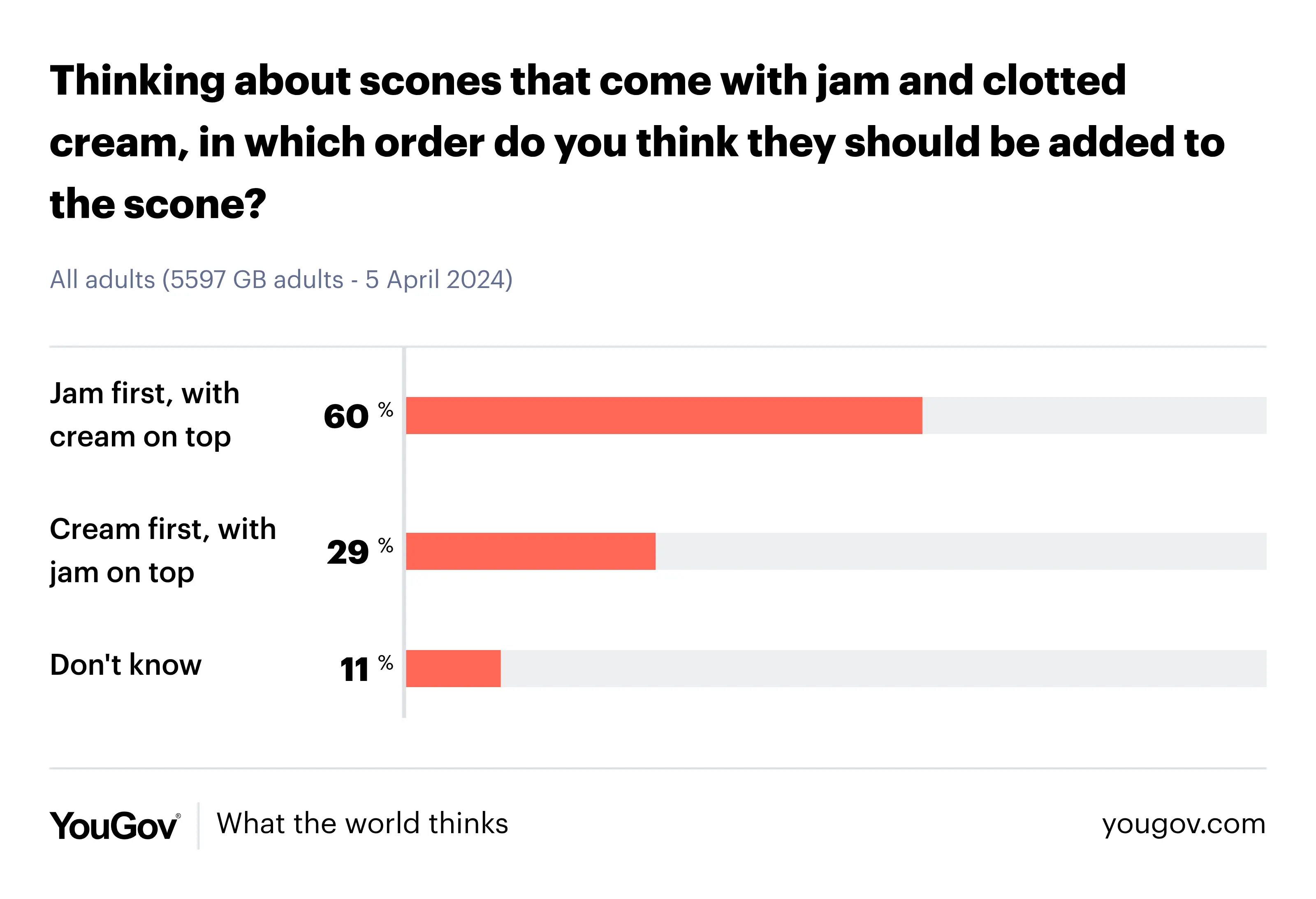

One thing to note is that the number of choices for each question is not constant; one question may have three answers to choose from, another may have five. We will make the assumption of independence, for example, what you call a sofa won't affect the ordering you put cream or jam on a scone. We also assume the survey results generalise to the population for our model, treating the sampling error as negligible.
For our model, we define a vector which has the number of choices for each
question n_outcomes <- c(5, 3, 3). Next, we define a vector which has the
probabilities for each choice given a question probs <- c(0.12, 0.26, 0.59,
0.01, 0.02, 0.6, 0.29, 0.11, 0.51, 0.38, 0.11). They're ordered such that the
probabilities for the five answers from the first question are placed first,
followed by the answers from the second question and so on.
My answers to the survey questions are as follows. I use the word "sofa". I
would put jam first so that it can be spread to lay a foundation for the cream.
Lastly, I would consider a Jaffa cake as a biscuit because of its small shape,
similar to other biscuits, and can be it consumed like one. With that said, you
can record my response as a vector, each element correspond to my answer
response <- c(3, 1, 1).
One of the steps in poLCAParallel is to calculate the likelihood. This is the
probability that someone random would answer those three questions the same as
me. In this example, we multiple three numbers together, 0.59, 0.6 and
0.51, from the vector probs.
Putting it into Practice
In terms of programming in C++, we will have to iterate through the three
vectors response, n_outcomes and probs. The vectors response and
n_outcomes are of the same length, one element for each question. Whereas
probs has an element for each multiple choice answer and for each question. In
addition, different questions have a different number of answers to choose from.
There are quite a few options to implement this. As discussed before, we will
separate the two ecosystems by converting Rcpp::NumericVector into a
std::span. In terms of iterating, we will use a range-based for loop to
traverse through n_outcomes and iterators, provided by std::span, for the
remaining vectors.
// [[Rcpp::plugins(cpp20)]]
// filename: survey.cc
#undef NDEBUG
#include <Rcpp.h>
#include <cstddef>
#include <span>
double Survey(std::span<const int> response, std::span<const int> n_outcomes,
std::span<const double> probs) {
// get iterators for response and probs
auto response_i = response.begin();
auto probs_i = probs.begin();
double likelihood = 1;
// range based for loop over n_outcomes
for (auto n_outcome_i : n_outcomes) {
assert(response_i < response.end());
auto prob_response = probs_i + *(response_i++) - 1;
assert(prob_response < probs.end());
likelihood *= *prob_response;
// move probs_i for the next survey question
probs_i += n_outcome_i;
}
return likelihood;
}
// [[Rcpp::export]]
double SurveyRcpp(Rcpp::IntegerVector response, Rcpp::IntegerVector n_outcomes,
Rcpp::NumericVector probs) {
return Survey(response, n_outcomes, probs);
}
The following R code runs our toy-example
Rcpp::sourceCpp("survey.cc")
n_outcomes <- c(5, 3, 3)
probs <- c(0.12, 0.26, 0.59,
0.01, 0.02, 0.6, 0.29, 0.11, 0.51, 0.38, 0.11)
response <- c(3, 1, 1)
likelihood <- SurveyRcpp(response, n_outcomes, probs)
print(likelihood)
There are quite a few things to unpack
- We converted a
Rcpp::IntegerVectorto astd::span<const int>. Theconstkeyword in the template ensures the contents of the arrays are not modified. - An iterator can be obtained using the method
begin(), like inauto response_i = response.begin(). This can be dereferenced into a value, using the*symbol, and incremented for the next survey question, using the++symbol. - The method
end()returns the address of the end of the array. We use this in our assertions to ensure our iterators do not go out of bounds. - Because each question has a different number of choices, we increment our
iterator for the probabilities accordingly, like in
probs_i += n_outcome_i
Zero-Based and One-Based Indexing
R uses one-based indexing, but C++ uses zero-based indexing. This can cause confusion or bugs if you are passing indices from R to C++ without being careful.
In the example above, this is why we subtracted one from the response in
*(response_i++) - 1.
Bleeding Edge
One of the problems with the range-based for loops, in our example, is that
it can only cater for one std::span. This is why we used iterators for the
arrays response and probs.
However, C++23 introduced a zip view
std::views::zip.
This can be used to make a range-based for loop over two std::span. We can
iterate through response and n_outcomes in the same for loop.
// [[Rcpp::plugins(cpp23)]]
// filename: survey.cc

#undef NDEBUG

#include <Rcpp.h>

#include <cstddef>
#include <ranges>
#include <span>

double Survey(std::span<const int> response, std::span<const int> n_outcomes,
              std::span<const double> probs) {
  auto probs_i = probs.begin();

  double likelihood = 1;
  for (auto [response_i, n_outcome_i] : std::views::zip(response, n_outcomes)) {
    auto prob_response = probs_i + response_i - 1;
    assert(prob_response < probs.end());
    likelihood *= *prob_response;
    probs_i += n_outcome_i;
  }
  return likelihood;
}

// [[Rcpp::export]]
double SurveyRcpp(Rcpp::IntegerVector response, Rcpp::IntegerVector n_outcomes,
                  Rcpp::NumericVector probs) {
  return Survey(response, n_outcomes, probs);
}
By putting response and n_outcomes in a zip, we can rely on std::span
providing us with the correct in-bound values without having to be
cautious and writing assertions for both of these arrays.
At the time of writing, C++23 is considered bleeding edge. Whilst it provides better practices as shown above, there could be a risk that some systems may not have implemented these new C++23 features, let alone C++20 ones. As a result, it's generally advised not to use new C++ standards too soon. But they can be pencilled in and rolled out once the compilers and standard libraries finish integrating the new C++ standards.
Conclusion
Old practices are allowed in C++ for backwards compatability but there are also newer ones to reduce the chances of introducing bugs and improving the C++ programming experience. However, some systems won't be compatible with these newer practices as they are too new and not yet implemented.
When I submitted my poLCAParallel package to CRAN, CRAN would do checks on my
package on multiple systems, such as Windows, MacOS and Linux, and with
different versions of R. We've found that a few C++20 features such as
std::jthread and
some implicit conversions are not available on older versions of Clang with
libc++, hence the package would not compile on CRAN's older MacOS systems.
Fortunately, their latest MacOS system can compile the package. We have the
choice of adjusting our code to cater for older systems or instructing MacOS
users to update their Clang compiler. We could even wait it out and the problem
should fix itself as newer MacOS systems adopt newer Clang versions by default.
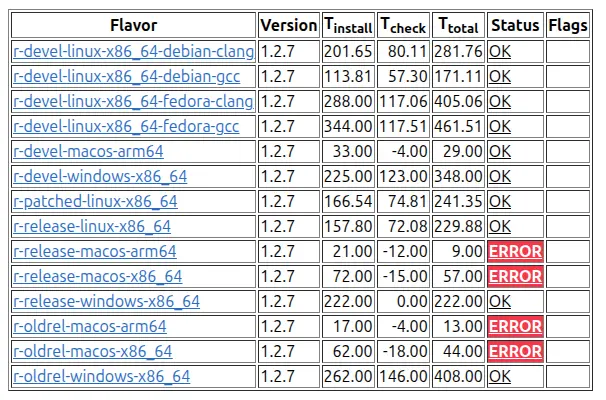 CRAN checks packages using various systems and versions of R (called flavours
in this table). The
CRAN checks packages using various systems and versions of R (called flavours
in this table). The poLCAParallel fails to compile on older MacOS systems.
In terms of future work and maintenance, we plan to use newer C++20 and C++23
features such as std::jthread and std::views::zip to improve the code base.
However, we also have to balance portability; to roll out these new practices
once the majority of systems have implemented these new features. Being too
early an adoptor could cause your software to be out of reach for the majority
of your users.